

By Nikolai Mercer | Updated on February, 2026 | 🕓 11 minutes
Key Highlights
- Why are digital nomads and freelancers more vulnerable to “subscription creep” than traditional employees?
- What is the “Seat Multiplier Trap” and why does it affect side hustlers so heavily?
- How do API charges and usage limits create unexpected hidden costs?
- Which AI tool categories are most likely to produce overlapping subscriptions?
- What percentage of monthly income should realistically go toward AI tools?
- How can freelancers audit and reduce their SaaS spending without hurting productivity?
One Tuesday afternoon last March, Alex sat in the corner of a café in Lisbon, holding a €1.50 bica espresso while staring at the credit card statement on his laptop screen. His fingers trembled slightly.
Alex is a Portugal-based freelance writer working with clients across three different countries. Over the previous 18 months, in an effort to “improve productivity,” he had gradually subscribed to a growing collection of AI tools. Each one seemed harmless on its own — “just the price of a coffee.”
- ChatGPT Plus: $20/month
- Claude Pro: $20/month
- Midjourney Standard: $30/month
- Notion AI: $18/month
- Grammarly Premium: $12/month
- Perplexity Pro: $20/month
- Fathom (meeting transcription): $19/month
- Krisp (noise cancellation): $8/month
- An AI writing assistant: $25/month
- An SEO analysis tool: $49/month
- A video generation tool: $30/month
- OpenAI API usage fees: $87 last month
Total: $338.
But that was not the full picture.
Alex suddenly remembered he also had a separate ChatGPT Team account ($25/month) registered for a side project, an image-processing tool he had only used twice the previous year ($15/month), and an automation platform he forgot to cancel after the “free trial” ended ($39/month).
Real total spending: $417/month.
In Lisbon, that amount was enough to rent a decent studio apartment. Alex’s monthly income was roughly $2,200, meaning nearly 19% of his income was disappearing into an AI subscription black hole.
“Every individual tool looked affordable,” Alex later told me, “but when I finally saw them all together, I felt robbed — and the worst part was that I had signed up for it myself.”
This is not just Alex’s story.
It is the story of millions of digital nomads, freelancers, and side hustlers around the world experiencing what is known as subscription creep.
1. Subscription Creep: The Underestimated “Digital Nomad Tax”
According to Flexera’s 2022 IT Asset Management Report, 29% of software spending went toward unused or underutilized SaaS subscriptions. By 2026, the situation had become even worse: small businesses were paying for an average of more than 15 different software subscriptions, with around 30% of the budget wasted on inactive seats. Even more alarming, annual SaaS spending per employee had climbed to $9,100 per year, a 15% increase compared to two years earlier.
But those numbers contain a blind spot: they measure “employees” inside companies.
Digital nomads and side hustlers often have it worse — because they do not have an IT department auditing their software expenses, a procurement team negotiating discounts, or a finance department reminding them to cancel zombie subscriptions.
For digital nomads, the subscription trap comes with five extra layers of risk:
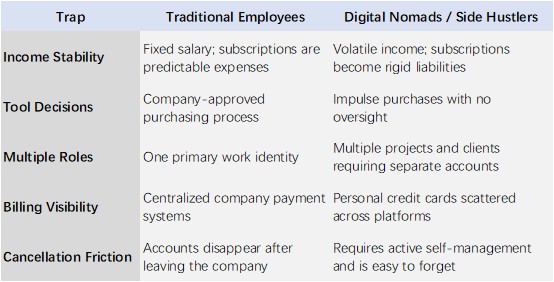
For digital nomads, AI subscriptions are not simply “productivity investments.” They become an invisible digital nomad tax — an ongoing and steadily growing tribute paid to Silicon Valley in exchange for the ability to work from anywhere in the world.
2. The Five “Boiling Frog” Mechanisms Behind the Freemium Trap
Freemium business models are not acts of generosity. They are carefully engineered systems rooted in behavioral economics.
2.1 The Seat Multiplier Trap
Many AI tools charge “per seat.”
For digital nomads, this becomes especially dangerous because one person often operates under multiple identities:
- One Notion workspace for freelance writing
- Another for an e-commerce side business
- A third for a podcast project still in development
Each workspace may require separate payment. Notion AI, for example, charges per workspace rather than per person. One individual managing three projects can easily end up paying triple.
2.2 The Usage Cliff
Free tiers appear generous — until you cross the threshold. Once that happens, pricing often jumps directly to expensive plans with no middle ground.
OpenAI’s API pricing is a classic example. GPT-4o API pricing is token-based, and output tokens often cost two to four times more than input tokens. You may use ChatGPT Plus ($20/month) for daily tasks, but if a sudden client project requires heavy content generation, API costs can skyrocket overnight.
One independent developer in London documented how an intense project sprint resulted in an OpenAI API bill of $1,330 in a single month — 66 times the cost of ChatGPT Plus.
Even more subtle are rate limits. ChatGPT Plus limits users to around 40 messages every three hours, while Claude Pro may allow approximately 100–150 messages every five hours. During a high-pressure deadline, suddenly seeing “usage limit reached — upgrade required” pushes users into emotionally driven upgrade decisions rather than rational financial choices.
2.3 The Integration Tax
The core product may look affordable, but using it effectively often requires three to five additional paid tools.
A typical content creator workflow might look like this:
- Core tool: ChatGPT Plus ($20)
- SEO plugin: $25/month
- Image generation: Midjourney ($30) or DALL-E API usage
- Publishing automation: Zapier ($19.99/month and up)
- Analytics and SEO data: another SEO platform ($49/month)
You think you purchased ChatGPT to write blog posts. In reality, you purchased an entry point into a much larger subscription ecosystem.
2.4 The Annual Payment Trap
“Save 20% with annual billing.”
This may be one of the most effective pricing tactics in the SaaS industry.
For salaried employees with stable income, annual plans can make sense. But for digital nomads, annual billing locks up cash flow. You pay upfront for a full year, but three months later the product may change pricing, redesign features, or even get acquired — and refunds are often unavailable.
Worse, many annual contracts hide automatic renewal clauses. Users must manually cancel 30 days before renewal or face another full-year charge.
David, an English teacher based in Chiang Mai, was automatically charged $288 for the annual renewal of a writing tool last year — despite not opening the app for three months.
2.5 API Creep
This is perhaps the most invisible trap.
Many software platforms advertise “AI-powered features,” but under the hood they rely on OpenAI or Anthropic APIs. Moderate usage can quietly generate extra charges.
Cursor is a good example. Cursor Pro at $20/month includes 500 “fast requests.” A developer making 30–40 AI interactions per day can burn through that allocation in two weeks. The remaining two weeks rely on “slow requests” with weaker models and higher latency. Maintaining productivity may then require upgrading to the $60/month Pro+ plan or even the $200/month Ultra tier.
3. The High-Risk AI Tool Stack of Global Digital Nomads
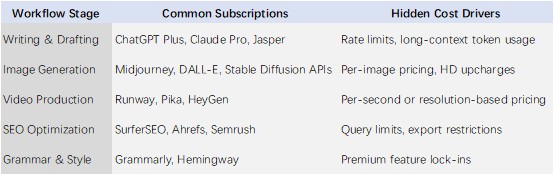
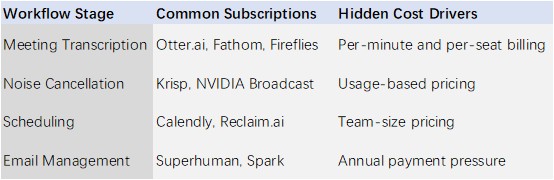
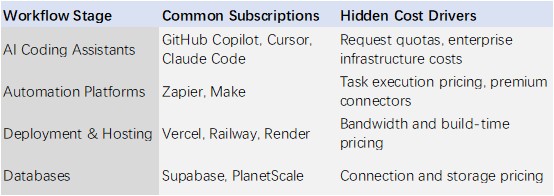
The following categories break down the most common subscription accumulation points across remote work workflows.
This is not a list of recommended tools.
It is a risk map showing where subscription redundancy tends to happen.
3.1 Content Creation Workflow (Most Likely to Overspend)
3.2 Meetings & Communication Workflow (Most Invisible Accumulation)
3.3 Coding & Automation Workflow (Most Dangerous API Black Hole)
3.4 Marketing & Operations Workflow (Most Easily Forgotten)
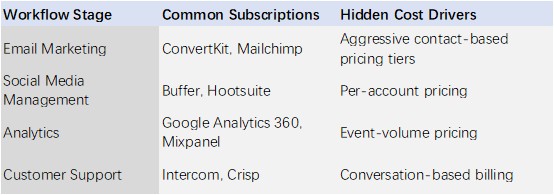
4. Self-Diagnosis: Auditing the Health of Your AI Subscriptions
Here is a practical framework you can use immediately. You only need a piece of paper or a spreadsheet.
4.1 Subscription Autopsy
Step 1: Export Your Billing History
Log into your bank account, PayPal, or credit card portal and export the previous 12 months of transactions.
Search for terms such as:
- “OpenAI”
- “Anthropic”
- “Midjourney”
- “Notion”
- “Adobe”
- “Zapier”
- “Stripe”
List every AI or SaaS subscription you can find.
Step 2: Categorize Each Subscription
Label every tool:
Daily Essential — you cannot work today without it
Weekly Utility — useful, but not core infrastructure
Unused Last Month — zombie subscription
Step 3: Calculate Cost Per Actual Use
```text
Cost Per Use = Monthly Fee ÷ Actual Usage Count
```
Example:
You pay $30/month for Midjourney and generated only 12 images last month.
Cost per image = $2.50.
But if only 3 of those 12 images were actually usable, your effective cost becomes closer to $10 per usable image.
Step 4: Identify Overlap
Ask yourself:
Am I paying multiple tools to do essentially the same thing?
Examples:
- Three LLM subscriptions? (ChatGPT + Claude + Gemini)
- Two note-taking systems? (Notion + Obsidian)
- Two transcription platforms? (Otter + Fathom)
4.2 The $500 Warning Line
Set a maximum AI tool budget based on your monthly income.
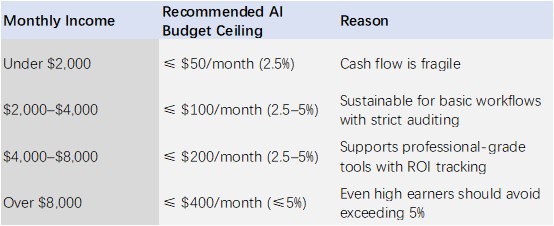
Why 5%?
Because AI tools should function as income leverage, not accumulated liabilities.
If your software stack costs more than 5% of your income, there is a good chance you are working for your tools rather than the other way around.
4.3 Feature Overlap Checklist
Review the following redundancy traps:
〇 Multiple LLM subscriptions (ChatGPT + Claude + Gemini + Perplexity)
〇 Multiple note-taking systems (Notion + Obsidian + Roam + Logseq)
〇 Multiple meeting transcription tools (Otter + Fathom + Fireflies + Tactiq)
〇 Multiple image generators (Midjourney + DALL-E + Stable Diffusion)
〇 Multiple writing assistants (Grammarly + Hemingway + ProWritingAid)
〇 Multiple project management systems (Trello + Asana + Monday + ClickUp)
〇 Multiple cloud storage services (Dropbox + Google Drive + iCloud + OneDrive)
Rule: Keep one primary tool per category. Eliminate the rest.
5. Escape Strategies: From Tool Hoarder to Minimalist AI Stack
5.1 The “One Tool Per Job” Principle
Keep only one primary tool for each workflow category.
Selection formula:
```text
Retention Score = Usage Frequency × Irreplaceability ÷ Monthly Cost
```
Practical Examples
Writing:
If 80% of your work involves long-form writing, Claude Pro may offer stronger long-context advantages. If you rely heavily on live web research, Perplexity Pro may be more valuable. Avoid paying for both simultaneously unless there is a clear business reason.
Image generation:
If you need precise artistic control, Midjourney may justify the cost. If you only occasionally need blog illustrations, ChatGPT’s built-in image generation could be enough.
Coding:
VS Code users may benefit more from GitHub Copilot’s native integration, while JetBrains users may prefer JetBrains AI. Running both simultaneously is often unnecessary.
5.2 Maximizing Free Tiers Without Abuse
This is not about exploiting platforms. It is about understanding the boundaries of free plans and extracting legitimate value within them.
Legitimate Approaches
Rotating Free Trials
Many SaaS tools offer 7- to 30-day trials. If you only need a feature occasionally — such as quarterly SEO audits — rotating between tools may be more economical than maintaining simultaneous subscriptions.
Student and Nonprofit Discounts
Platforms such as Notion, GitHub, and Figma offer substantial discounts or free plans for eligible users.
Lifetime Deals (LTDs)
Some AI startups offer lifetime licenses through marketplaces like AppSumo. If you genuinely expect long-term usage, a one-time payment can outperform subscriptions financially. However, many LTD products stagnate after acquiring users.
Open-Source Alternatives
For non-core workflows, open-source tools can replace paid services. Examples include running local LLMs through Ollama or using Penpot instead of Figma for lightweight design work.
5.3 Local-First Alternatives
For privacy-conscious users or those seeking lower long-term costs, local AI setups may provide meaningful savings.
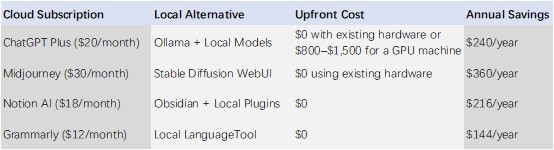
The Trade-Off
The real trade-off is:
Setup time now vs. subscription costs forever.
For non-technical users, this may not be worthwhile. But for technically inclined digital nomads willing to spend a weekend learning, the savings can amount to hundreds or even thousands of dollars over time.
5.4 The Quarterly Subscription Review Ritual
Create a repeating calendar event every three months titled:
“Subscription Cleanup Day.”
30-Minute Review Process
1. Open every subscription billing dashboard
2. Identify zombie subscriptions
3. Check for feature overlap
4. Search for cheaper alternatives
5. Cancel unnecessary plans
6. Update your AI budget tracking sheet
A Useful Trick
Many SaaS platforms display “retention offers” when you click “cancel subscription,” such as temporary discounts or bonus features.
You can occasionally use these offers strategically — but never keep a subscription solely because of a discount.
5.5 Income-Scaled Budgeting
Keep total AI spending below 5% of monthly income.
Upgrade tools only after income increases — not in anticipation of future earnings.
Suggested Allocation Structure
- 60% for core infrastructure tools
- 30% for efficiency-enhancing tools
- 10% for experimental tools
If an experimental tool fails to justify itself by the end of the quarter, cancel it.
Conclusion: Your Subscriptions, Your Life
In the narratives surrounding remote work and the side-hustle economy, AI tools are often marketed as “keys to productivity freedom.”
But too many keys eventually become chains.
The digital nomad lifestyle is built on the promise of geographic freedom. Yet if your cash flow is controlled by endless subscriptions, you are not truly free — you have simply changed landlords. Instead of paying rent to a physical office, you are now paying rent to Silicon Valley.
This week, spend 30 minutes conducting a subscription autopsy.
List every AI and SaaS subscription. Calculate your total monthly cost. Identify zombie subscriptions. Detect overlapping functionality.
You do not need to become a minimalist.
But you do need to become the curator of your tool stack instead of its collector.
Because ultimately, your value is not measured by how many tools you own — but by what you create with them.
FAQs
1. Why are AI tools especially prone to subscription creep?
AI tools often rely on freemium pricing models, API usage billing, feature gating, and ecosystem integrations. Users frequently subscribe to multiple overlapping tools because no single platform fully replaces the others.
2. How much should freelancers or digital nomads spend on AI tools?
A commonly recommended guideline is keeping total AI and SaaS expenses below 5% of monthly income. Exceeding that level may indicate inefficient spending or excessive tool overlap.
3. Can free AI plans realistically replace paid subscriptions?
In some cases, yes. Many users can combine free tiers strategically and reduce the number of paid tools they need. However, heavy professional workloads often require at least a few paid subscriptions for reliability and higher usage limits.
4. Is using multiple AI models simultaneously inefficient?
It depends on the workflow. Some professionals benefit from specialized models for different tasks. However, many users subscribe to multiple general-purpose AI assistants that overlap heavily in functionality.
5. What is the best way to audit AI subscriptions?
A practical approach includes:
Exporting 12 months of payment history
Listing all recurring SaaS charges
Categorizing tools by actual usage frequency
Calculating cost-per-use
Removing overlapping or inactive subscriptions
References
1. Statista. (2025). Average SaaS Spending Per Employee Worldwide. Statista Research Department. https://www.statista.com/
2. OpenAI. (2026). API Pricing Documentation. OpenAI Platform Documentation. https://platform.openai.com/
3. Anthropic. (2026). Claude Usage Policies and Pricing. Anthropic. https://www.anthropic.com/
4. Zapier. (2025). Automation Pricing and Task Limits Explained. Zapier Help Center. https://zapier.com/
5. Harvard Business Review. (2023). The Subscription Economy Is Changing Consumer Behavior. Harvard Business Review. https://hbr.org/
6. Deloitte. (2025). Digital Nomadism and the Future of Independent Work. Deloitte Insights. https://www2.deloitte.com/
7. IDC. (2025). Worldwide SaaS and Cloud Services Spending Guide. International Data Corporation (IDC). https://www.idc.com/
About the Author
Nikolai Mercer
Nikolai Mercer is a technology operations analyst and SaaS infrastructure researcher focused on enterprise software ecosystems, AI implementation strategies, and subscription-based technology economics. His work explores how organizations adopt AI tools, where automation initiatives fail, and why many modern SaaS products prioritize investor narratives over measurable operational improvements. Nikolai writes extensively about AI-related spending, hidden implementation costs, workflow inefficiencies, and the long-term sustainability challenges facing software-dependent businesses.
Editorial Transparency Statement
This article was independently researched and written for informational and educational purposes. The analysis is based on publicly available pricing data, SaaS industry reports, documented user experiences, and broader trends within the AI software ecosystem as of 2026.
The article does not receive sponsorship from the companies or tools mentioned. No affiliate relationships influenced the editorial direction of this content. Product examples are included strictly for explanatory and analytical purposes.
Pricing structures, subscription models, API fees, and platform policies may change over time. Readers are encouraged to verify current pricing and terms directly through official provider websites before making financial decisions.
Disclaimer
This content is intended for general informational purposes only and should not be considered financial, investment, legal, accounting, or tax advice. Individual financial situations, business structures, and software needs vary significantly.
Readers should independently evaluate subscription costs, contractual obligations, cancellation policies, and workflow requirements before purchasing or canceling any software service. Before terminating subscriptions, users should ensure important data, files, and project materials have been properly exported or backed up.