

By Nikolai Mercer | Updated on March, 2026 | 🕓 11 minutes
Key Highlights
- Is your “AI assistant” actually different from using ChatGPT directly?
- How can you tell whether an AI feature is a real innovation or just a wrapper?
- What are the biggest risks of relying too heavily on SaaS AI tools?
- How can you build workflows that benefit from AI without becoming dependent on it?
Last winter, I was revising drafts in a shared apartment in Lisbon. I was paying $29 a month for a U.S.-based project management tool. One day, after logging in, I noticed a purple star icon in the top-right corner: “Ask AI.”
I typed: “Help me break this content plan into actionable tasks.”
Ten seconds later, the result looked almost identical to what I got by opening ChatGPT in my browser and pasting in the same title myself — actually slightly worse, because the tool had no awareness of the specific context I had built up over the previous three months inside the project.
What made it even more ironic was that this “AI assistant” required an additional $15 per month. Meanwhile, the ChatGPT subscription in my browser only cost $20 a month at the time.
So why are “AI buttons” suddenly everywhere?
This is not a technological revolution. It is a collective projection of commercial anxiety.
Between 2024 and 2025, SaaS companies without an AI story struggled to raise funding. But most companies had no actual model capability, so they spent a few weeks wrapping the OpenAI API inside their interface and adding an “AI-powered” label to the pricing page.
Notion added AI, so ClickUp had to add AI. ClickUp added AI, so Monday.com had to follow. Differentiation disappeared. “AI-powered” stopped being a selling point and became background noise.
73% of SaaS vendors now position AI as a paid add-on, while 68% lock it behind higher-tier plans. In many cases, you are not paying for AI itself — you are being forced to upgrade your entire subscription package just to access it.
In 2024, the FTC launched “Operation AI Comply” to crack down on AI washing, and by 2025 had initiated at least 12 enforcement actions. But many companies did not respond by improving their AI capabilities. Instead, they simply made their marketing language more vague.
The Five-Level Capability Spectrum: Where Does Your AI Button Sit?
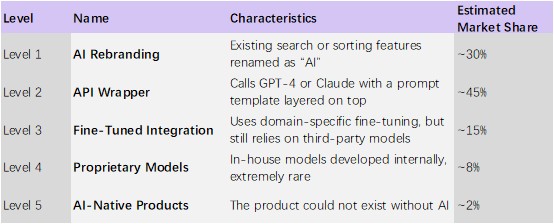
Roughly 75% of SaaS AI features fall into Level 1 or Level 2. The “AI button” you are paying for is, in most cases, little more than an HTML prompt wrapper.
Three Common Traps
1. The Wrapper Trap
A typical Level 2 wrapper works like this:
You enter text → the SaaS inserts it into a pre-written prompt → calls the OpenAI API → formats the output → charges you an extra $10–30 per month.
The danger is simple: the moment the underlying model provider integrates the same functionality directly, the wrapper dies instantly.
By late 2025, ChatGPT began experimenting with recommending third-party applications inside conversations. The feature was paused after user backlash, but the direction was obvious: model providers are moving downward and consuming the application layer itself.
2. The Verification Tax
According to Stack Overflow’s 2025 global developer survey, 66% of developers spent more time fixing “almost correct but not entirely correct” AI-generated code, while 45% identified this as their biggest frustration when using AI.
For freelancers, the promised “time savings” of AI are often canceled out by the time spent verifying and correcting outputs.
You save 10 minutes drafting something, then spend 15 minutes checking for mistakes.
3. The Data Backdoor
Many wrappers fail to disclose where user data actually goes.
In 2025, the design platform Figma faced a class-action lawsuit in which plaintiffs alleged that customer design files had been used to train AI models without consent.
This is not just a technical issue. It is a trust issue.
Real-World Test: I Audited My Own Tool Stack
I used three questions to evaluate the tools in my workflow. You can copy them directly:
The Three-Question AI Capture Test
1. If the AI feature disappeared today, would the product’s core value still remain?
2. Can the vendor clearly explain how its AI differs from simply using ChatGPT directly?
3. Does accuracy improve over time based on your own data?
A U.S. Project Management Platform
Its “AI task breakdown” feature simply sent the title to GPT-4 and returned a list of subtasks. The quality was worse than what I could produce myself.
Level 2 wrapper. Not worth paying for.
An Australian Note-Taking App
Its “AI writing assistant” was basically an embedded ChatGPT sidebar. It could not access my historical notes at all, which made the idea of “context awareness” meaningless.
Another Level 2 wrapper.
A European CRM Platform
Its “AI predictive scoring” was based on simplistic rules. My own judgment was more accurate than its recommendations.
Classic Level 1 rebranding.
One statistic repeated constantly across Reddit discussions: 85% of free Claude users never upgrade to paid plans, and 60% of ChatGPT users make fewer than 20 queries per day.
Most people dramatically overestimate their actual AI usage needs. SaaS companies are exploiting that overestimation by packaging AI as something “essential.”
The 20-Question AI Feature Scorecard
Directly usable.
Model and Architecture (5 Questions)
1. Does the vendor clearly identify the underlying model?
2. Is there proprietary value beyond a simple API call?
3. Does the system rely on a single model provider?
4. Is fine-tuning performed on your own data?
5. Is AI part of the core architecture or just an added feature?
Data Governance (4 Questions)
6. Will your data be used to train shared models?
7. Is there a clear AI data-processing agreement?
8. Are data storage and processing locations clearly disclosed?
9. Can AI-derived data be deleted after service termination?
Performance and Reliability (4 Questions)
10. Does the vendor provide production-level accuracy metrics?
11. Are failure modes explicitly disclosed?
12. Are low-confidence outputs clearly flagged?
13. Can the system be tested using your real-world data?
Workflow Integration (4 Questions)
14. Is AI embedded into workflow automation, or merely a sidebar suggestion tool?
15. Are human review checkpoints clearly defined?
16. Is there a clear escalation path for AI-related errors?
17. Are AI decisions recorded in audit logs?
Maturity (3 Questions)
18. Is the AI feature already live, or merely promised on the roadmap?
19. Has accuracy measurably improved over the past six months?
20. Are there existing customers specifically endorsing the AI functionality?
Score Interpretation
- 80–100: Trustworthy AI, worth testing
- 60–79: Partial capability, purchase cautiously
- 40–59: Mostly marketing, likely just a wrapper
- Below 40: Surface-level AI theater, evaluate the product on its non-AI value instead

The Side-Hustle Trap: How It Eats Your Profit
Cost Erosion
A typical digital nomad tool stack includes project management, note-taking, design software, finance tools, and communication apps.
If every AI add-on costs an additional $10–20 per month, that becomes $720–2160 per year.
The average American consumer now spends $273 per month on subscription services across roughly 12 subscriptions. For freelancers with unstable income, this “AI tax” can consume 5–10% of annual earnings.
Skill Decay
Overreliance on Level 1 and Level 2 wrappers gradually weakens core professional skills.
The true competitive advantage of digital nomads is independent execution capability — not the ability to click AI buttons.
If a SaaS AI feature goes offline and you can no longer complete the task yourself, then you have become dependent on the platform.
Client Risk
If you directly deliver SaaS-generated AI content to clients and the output quality fluctuates, your professional credibility suffers.
My personal rule is simple:
AI may produce drafts. It should never produce final deliverables without human review.
Five Things You Can Do Immediately
1. Conduct an “AI Button Audit” This Week
Open every paid SaaS product you use and honestly ask yourself:
- How many times have I actively used this AI feature in the last 30 days?
- Is the output actually better than doing it myself or using ChatGPT directly?
- If this feature disappeared tomorrow, how much would my workflow truly suffer?
If the impact is less than 10%, downgrade to the basic plan immediately.
2. Implement a Decoupling Strategy
Do not tie your AI capabilities to a single SaaS platform.
- Use basic plans for core SaaS tools
- Run AI workflows directly through ChatGPT, Claude, or Gemini
- Connect the two using browser extensions or automation tools
3. Perform Quarterly SaaS Subscription Audits
List every subscription, monthly fee, and usage frequency.
A simple formula:
Tool Value Score = (Days Used Last Month × Average Usage Duration Per Session) ÷ Monthly Cost
If the score is below 1, consider canceling it.
4. Build a Verification Checklist
For any AI-generated content delivered to clients, force yourself to verify:
〇 Factual accuracy
〇 Tone and brand consistency
〇 Logical coherence
〇 Privacy compliance
5. Invest in Real Moats
Use the money saved from AI add-ons to learn prompt engineering, deepen your core professional skills, and build your own workflow systems.
Conclusion
In a café in Mexico City, I once met a freelance illustrator whose tool stack was shockingly simple: an old version of Photoshop, a free note-taking app, and Claude running in a browser tab.
Her monthly income consistently exceeded $8,000.
I asked her:
“Don’t you use all those new AI-powered tools?”
She replied:
“I tried them. They just helped me produce bad work faster. Clients do not pay for speed. They pay for quality.”
AI itself is not the trap.
The trap is when someone wraps another company’s API in a new interface, adds a 50% markup, and convinces you that you can no longer function without it.
AI will not replace you. But the monthly fees you keep paying for pointless AI buttons might replace your savings.
Real digital nomads do not survive because of tool logos. They survive because of the boundaries of their own capabilities.
FAQs
1. Are AI add-ons worth paying for?
That depends on whether the feature materially improves your workflow. If the output quality is similar to directly using ChatGPT or Claude, paying extra inside a SaaS platform may not provide enough additional value.
2. Why do AI tools sometimes increase workload instead of reducing it?
Many AI outputs are “almost correct,” requiring users to spend additional time verifying facts, correcting mistakes, and rewriting content. This verification process can erase the productivity gains promised by AI marketing.
3. What is the biggest risk of relying too heavily on SaaS AI?
Overdependence on AI-assisted workflows can weaken core professional skills. If a tool becomes unavailable or inaccurate, users may struggle to complete tasks independently.
4. Can SaaS AI tools use customer data for training?
Some platforms may use uploaded data to improve models or train systems, depending on their policies. Users should always review AI data-processing agreements and privacy terms before enabling AI features.
5. What makes an AI-native product different?
AI-native products depend fundamentally on AI to function. Without AI, the product itself would not meaningfully exist. In contrast, many SaaS AI features are simply optional layers added onto traditional software.
References
1. Figma, Inc. Litigation Records. (2025). Class-action allegations regarding AI training data usage. Retrieved from https://www.pacermonitor.com/
2. Gartner, Inc. (2025). Emerging trends in enterprise AI adoption and SaaS integration. Retrieved from https://www.gartner.com/
3. McKinsey & Company. (2025). The state of AI in business workflows. Retrieved from https://www.mckinsey.com/
4. Reddit User Discussions. (2024–2025). Community discussions on AI subscription behavior and SaaS AI fatigue. Retrieved from https://www.reddit.com/
5. Statista. (2025). Average subscription spending among U.S. consumers. Retrieved from https://www.statista.com/
About the Author
Nikolai Mercer
Nikolai Mercer is a technology operations analyst and SaaS infrastructure researcher focused on enterprise software ecosystems, AI implementation strategies, and subscription-based technology economics. His work explores how organizations adopt AI tools, where automation initiatives fail, and why many modern SaaS products prioritize investor narratives over measurable operational improvements. Nikolai writes extensively about AI-related spending, hidden implementation costs, workflow inefficiencies, and the long-term sustainability challenges facing software-dependent businesses.
Editorial Transparency Statement
This article is based on a combination of firsthand workflow testing, publicly available industry reports, developer surveys, legal cases, and independent market observations from 2024–2026.
The opinions expressed in this article are intended for informational and educational purposes. Product examples mentioned in the article are used illustratively and do not constitute financial, legal, or investment advice.
The author does not receive sponsorship payments from the SaaS companies discussed in this article unless explicitly disclosed.
Disclaimer
The information in this article is provided for general informational purposes only and should not be interpreted as legal, financial, cybersecurity, or professional business advice.
AI tools, SaaS pricing structures, privacy policies, and product capabilities may change over time. Readers should independently verify vendor claims, review official documentation, and evaluate software solutions according to their own operational and compliance requirements.
Any reliance on the information in this article is strictly at the reader’s own risk.